
Online Safety (E – Safety)
Helping Children Stay Safe, Happy and Responsible Online
The internet offers wonderful opportunities for children to learn, explore, create and communicate. However, it is important that children develop the knowledge and skills to use technology safely, responsibly and respectfully.
At Winford Church of England Primary School, online safety is an important part of our safeguarding responsibilities and wider curriculum.
Our Christian vision, Together we Flourish, and our values of Aspire, Belong and Care underpin our approach. We want children to make the most of technology, feel confident seeking help and understand how their actions online affect themselves and others.
How We Teach Online Safety at Winford
Online safety is taught throughout the school as part of our computing curriculum, PSHE lessons and wider safeguarding education.
Children learn about:
-
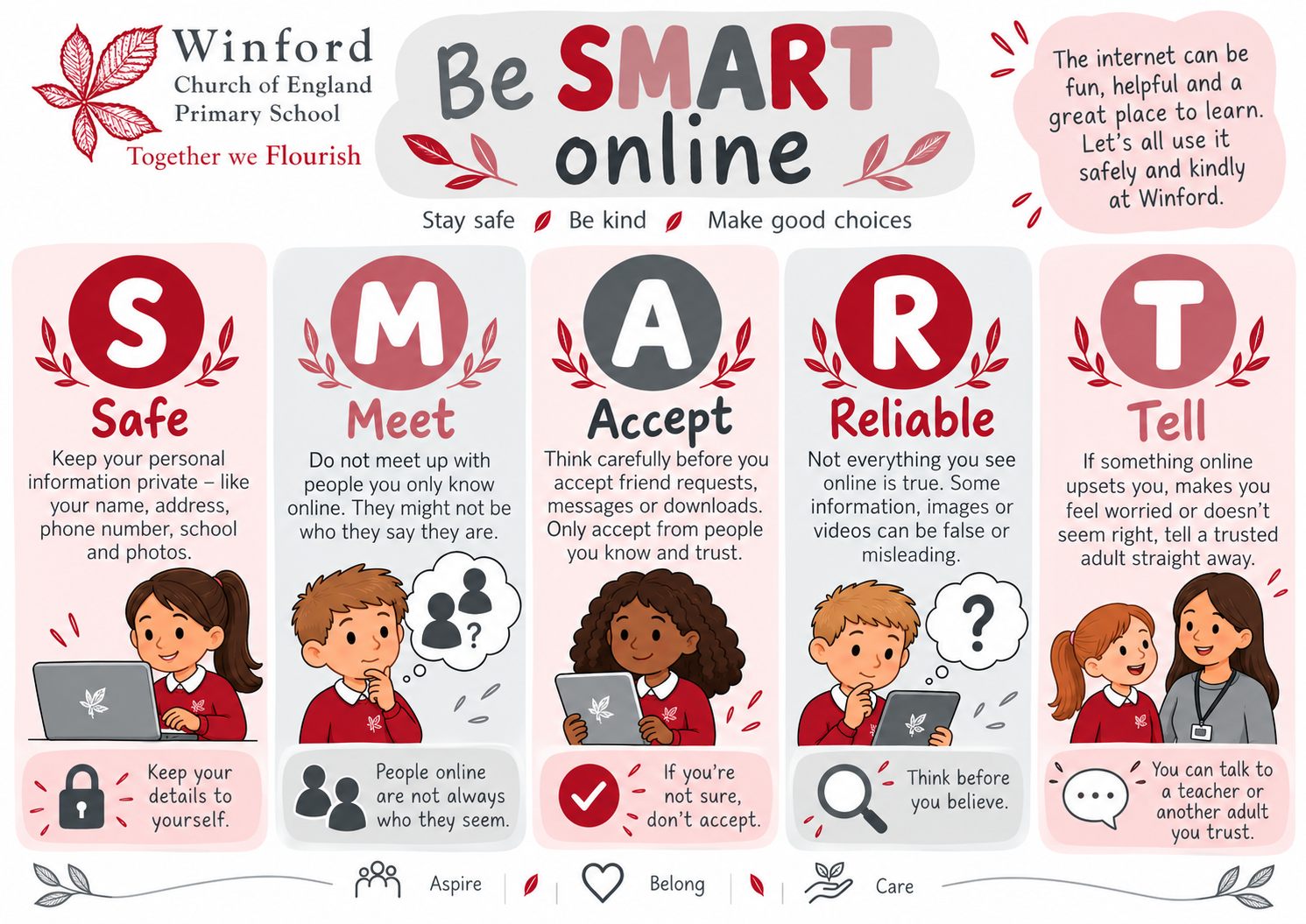
Keeping personal information private and protecting passwords.
-
Recognising that not everything they see online is true or trustworthy.
-
Being kind and respectful when communicating online.
-
Understanding online friendships and the risks of communicating with strangers.
-
Recognising cyberbullying and knowing how to respond.
-
Understanding that photographs, messages and other online activity can leave a digital footprint.
-
Knowing what to do if something online makes them feel worried, uncomfortable or unsafe.
-
Recognising the importance of balancing screen time with sleep, exercise, friendships and other activities.
We reinforce these messages through assemblies, class discussions and age-appropriate activities.
Our school rules, Ready, Respectful, Safe, apply to online behaviour as well as face-to-face interactions.
Supporting Your Child at Home
Parents and carers play a vital role in helping children develop safe online habits.
We encourage families to:
Talk regularly. Take an interest in the games, apps and websites your child enjoys. Ask what they like about them and who they communicate with.
Keep devices in shared spaces. Particularly for younger children, using technology where adults are nearby makes supervision and conversations easier.
Use parental controls. Set up appropriate restrictions on devices, games, streaming services and home broadband. Review these as children grow.
Check age ratings. Many social media platforms and games have minimum age requirements. Consider whether the content and communication features are appropriate for your child.
Discuss online friendships. Help children understand that people online may not always be who they claim to be.
Encourage kindness. Remind children that the same expectations for respect and behaviour apply online.
Agree family boundaries. Establish sensible routines around screen time, bedtime, gaming and device use.
Make it easy to ask for help. Reassure your child that they can always tell a trusted adult if something online worries them, even if they have made a mistake.
Smartphones, Social Media and Group Chats
We recognise that children are accessing online games, messaging services and social media at increasingly young ages.
Group chats, in particular, can sometimes lead to friendship difficulties, exclusion, unkind comments or misunderstandings that affect relationships in school.
We encourage parents to think carefully before allowing primary-aged children to use messaging platforms or social media, and to supervise their use appropriately.
Some helpful questions to consider include:
-
Is my child old enough to use this app or service?
-
Who can contact them or see what they share?
-
Do they understand how to block and report someone?
-
Could messages or photographs be shared beyond the intended group?
-
Would they feel confident telling me if something went wrong?
If online disagreements begin to affect children in school, please speak to your child's class teacher so that we can work together to support those involved.
Mobile Phones and Smart Devices in School
Winford is a phone-free school, in line with our expectations for a safe and focused learning environment.
Children should not bring mobile phones or other personal electronic devices to school.
Where an older pupil needs a mobile phone for travelling independently to or from school, parents must obtain permission and complete the school's acceptable use agreement. Approved phones are stored securely during the school day.
Smartwatches with messaging, camera or similar communication functions are not permitted.
Please contact the school office if you have any questions about these arrangements.
What Should I Do if My Child Experiences Something Worrying Online?
If your child sees something upsetting, receives an inappropriate message or experiences unkind behaviour online:
-
Stay calm and listen. Reassure your child that they have done the right thing by telling you.
-
Avoid blaming or punishing them for speaking up. Children need to feel confident that asking for help is safe.
-
Preserve relevant evidence where appropriate. This may include messages, usernames or dates. Do not save or forward sexual images of children.
-
Block and report. Use the platform's reporting tools and privacy settings.
-
Seek further help. Contact the school if the issue affects your child or other pupils. Report serious concerns to the appropriate safeguarding or law-enforcement service.
If you believe a child is in immediate danger, call 999.
Reporting Online Safety Concerns
There are several trusted organisations that can provide advice and support.
CEOP Safety Centre
If you are concerned that an adult has been communicating inappropriately with a child online, including grooming or sexual exploitation, you can make a report to the Child Exploitation and Online Protection service.
Report Harmful Content
Advice and reporting support for harmful content encountered online.
Childline
Free, confidential support for children and young people.
0800 1111
Internet Watch Foundation
Report suspected child sexual abuse imagery found online.
Visit the Internet Watch Foundation
Useful Online Safety Resources for Families
UK Safer Internet Centre
Information and advice about online safety, privacy, social media and emerging risks.
Internet Matters
Practical guides to parental controls, devices, gaming, social media and age-appropriate online experiences.
NSPCC – Keeping Children Safe Online
Advice for parents about online risks, conversations and supporting children.
Childnet
Child-friendly resources, family activities and online safety guidance.
Thinkuknow / CEOP Education
Age-appropriate resources to help children understand online risks and how to seek help.
Working Together to Keep Children Safe
We believe that online safety works best when children, parents and school work together.
If you have concerns about your child's online experiences, or if something happening outside school is affecting their wellbeing or friendships, please speak to their class teacher or contact our safeguarding team.
School Office: 01275 472730
Email: office@winfordprimary.com
For further information about our safeguarding arrangements, please visit our Safeguarding at Winford page.
Together we Flourish
Aspire to make good choices. Belong to a respectful community. Care for ourselves and others – online and offline.